
LightMaster Nautical Training and Software
Enhancing your safety and enjoyment afloat
VHF DSC Radio
Training Simulator
Additional Information
Every vessel going out to sea or navigating major rivers should have a VHF radio on board. It is a vital piece of equipment for safety, for ship management, and may be mandated by local regulations.
Almost all current VHF radios incorporate circuits for Digital Selective Calling (DSC). The sets may be permanently mounted on the vessel, or portable, handheld units.
Any radio operating on the marine VHF band must be covered by two types of licence. The unit itself must be listed on a ship radio licence and it may only be operated under the authority of a licensed user. They must hold a Short Range Certificate or higher.

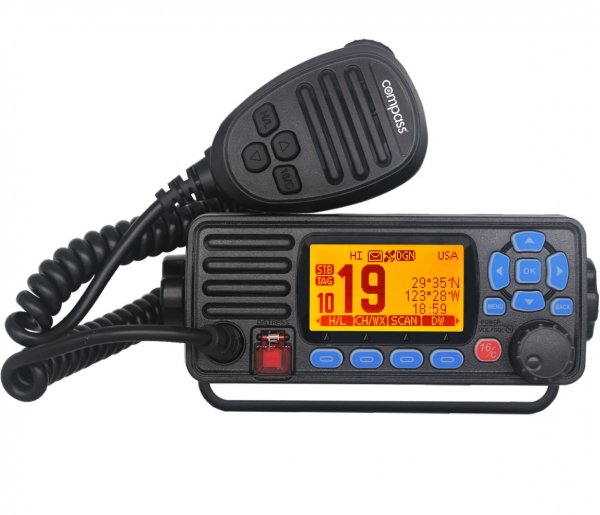
Simulator mimics controls of real equipment
Display looks exactly like that on physical set
Unique design acts as both ends of messaging
Vital Distress Alerts can be practised. You must not attempt this on live radio equipment.
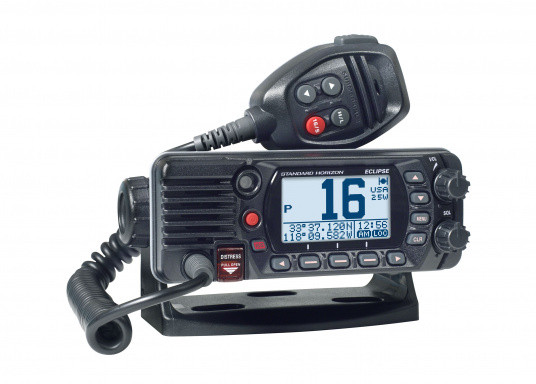
Main Radio Controls
Power : Volume knob switches set on or off
Volume Knob : Controls amplification of receiver
Squelch : Adjusts the threshold of accepted signal strength for maximum sensitivity
Channel Selection Knob : Selects the required channel. Also selects menu items and is used to input characters to various memory functions
16 / 9 Button : Direct selection of emergency and calling channels
WX Button : Direct selection of US weather channel. Not implemented on this Simulator
Distress Button : A covered button which can directly launch a Distress Alert.
Call Button : Initiates sequence to transmit a DSC Alert or Announcement
Menu : Secondary function of Call button. Enters the menus to use many system functions
Scan Button : Activates one of the automatic channel scanning sequences. Not active
Mem : Secondary function of Scan button. Not active on the Simulator
DW / IC Button : Toggles Dual Watch to monitor two channels at once. IC not active
ENTER Button : Select, confirm or accept the current option or input
CLEAR Button : Reject, cancel or clear the current option or input
PTT Button : Simulates pressing the Press To Talk button on the microphone handset
MMSI Label : Users outside UK can personalise the Main radio MMSI to match their own Country Codes
MMSI Number : The allocated MMSI of the Main radio is used to control response to incoming alerts and to populate the MMSI field in outgoing Alerts and Announcements
A few controls are not implemented, because they cannot be demonstrated on a simulator, or only apply in limited circumstances.
Remote Radio Controls
On / Off : Turns Remote radio set on or off
Routine Button : Transmits a Routine Individual Announcement to the Main radio
Group Button : Transmits a Routine Group Announcement to the Main radio
Safety Button : Transmits a Routine Safety Announcement to the Main radio
Urgency Button : Transmits an All Ships Urgency Announcement to the Main radio
Distress Button : Transmits an All Ships Distress Alert to the Main radio
Distress Ack Button : Sends a Distress Acknowledgement Announcement to the Main radio. Allows two-way Distress practice, normally not possible
Send Button : Actually transmits the Alert ot Announcements selected above
Accept Button : Transmits an acknowledgement to the Main radio, after an Announcement is received
Cancel Button : Clears any alert from Remote display and resets the Remote radio
GPS Simulator
On / Off Button : Switches on or off the GPS Simulator
Local GPS : This GPS simulator supplies position and time data to the Main radio
Time Output : The GPS Simulator passes the current time to the Main radio
Position Output : A succession of Lat/Long position data are passed to the Main radio
Passage : The positions are chosen to simulate a tour around a local area
Local Area : The Simulator’s Config Menu permits choosing any starting position
Exercise Manager is a complete exercise editing and display system, with multiple controls
LightMaster VHF Radio Simulator
Digital Selective Calling
Equipment Familiarisation
Alerts or Announcements
Short Range Certificate
Variety of DSC Equipment
Network Link Module
Licences
Software Licence Types & Conditions

Individual Licence
- Issued for personal study by one named individual
- Non-Transferrable
- Only the named individual or immediate family at same address to use it
- Not valid for any other person to use
- Can be used on more than one PC, but only for use by the one licensed person
- NOT valid for use on classroom PCs
- NOT valid for teaching any other person
Software Licensing
You do not buy or own the software. You buy a licence or licences, which permit you to use the program in either a personal or a shared-use capacity.
An instructor may purchase a Personal Licence to learn the subject, or evaluate the best way to structure their teaching. They must be in possession of a Professional Licence before using the software to provide access to any other person.
The software is provided with no time limit on use, unless it is provided as an evaluation copy, with a time limit. You may continue to use the software on the licensed PCs for so long as they are running compatible versions of Windows. We cannot guarantee to provide updates if future OS changes prevent them from working.
Software Pricing
Personal Radar Simulator £70 GBP
Professional Radar per PC £495 GBP
More than 2 Pro Licences – Call for Best Quote

Professional Licence
- Issued for one PC per licence
- Non-Transferrable
- Can be used for
- a succession of different students
- Can be used under different tutors at one location
- Can be used by one tutor at different locations but only one PC per licence
- Is valid for use on classroom PCs
- Is valid for teaching any other person
Talk With an Expert to Choose the Best Software for You!
If you are not quite sure which Licence or Program is best for your intended use, just call or email us. Details are on the Contact page.
What They’re Saying
Customer Testimonials
I was always a bit nervous using the VHF radio when told to. I took an online course, but was never confident of pressing the right buttons. After the hands-on practice sessions at home, I now well prepared to take my SRC examination
I am pleased to recommend the LightMaster VHF software. Thanks to the step-by-step video tutorials, followed by real practice repeating each operation until it was second nature, I now find it as easy to use the radio as my mobile
After my great experience using the Radar Simulator, it was a no-brainer to polish up my radio operation using their VHF Simulator. The physical operation of the radio is so well ingrained, I only need think about what to say
Boost Your Confidence
Join thousands of other leisure and commercial seafarers with LightMaster Simulators
There’s no better way to gain such valuable experience, so quickly and in complete safety